kyy-logs
Install Code Review Gate
Pick your agent. Every command is ready to paste.
npx skills add kyy-logs/code-review-gate-skill --skill code-review-gateThe open skills CLI detects your agents (Claude Code, Cursor, Codex and 70+ more) and installs to the right folder. Add -g to install globally.
01
Install it
Run the command above, or upload the folder in Claude.
02
Ask naturally
Describe the task. Your agent loads code-review-gate when the request matches its description.
03
Name it if needed
If it does not trigger, say “use the code-review-gate skill”. In Codex, type $code-review-gate.
Code Review
Check for code defects, test quality, and change impact, and confirm that the issues found are closed.
Resources and Execution Location
references/,scripts/, andassets/are relative to the directory containing theSKILL.mdread for this run.- Run shell commands from the reviewed project root;
docs/work/, code paths, and project rules all belong to the reviewed project. CODE_REVIEW_SKILL_DIRbelow is the absolute path of the skill installation directory. Set it on every shell invocation, or replace it directly with the actual absolute path; do not assume variables persist across different shell invocations.- Scripts require basic commands such as Bash 3.2+, Git, awk, grep, and sed. Invoke them via
bash; no executable bit is needed. - Report parsing requires Python 3.9+ and PyYAML;
pythonis invoked by default, andCODE_REVIEW_PYTHONcan specify the interpreter's absolute path. For installation, see the release repository README; the in-repo entry point isscripts/install.py.
Scope
- Review functional, bug-fix, refactoring, or configuration changes that affect code behavior.
- Pure documentation, formatting, or typo changes that do not affect code behavior may be skipped.
- Static review is still possible when tests fail or have not been run; the report must state the test status and must not claim that merge conditions are met.
Inputs
| Input | Required | Description |
|---|---|---|
| git repository + diffable changes | Yes | Specify whether to review uncommitted changes or a committed base/head range |
| Acceptance criteria | No | When provided, check them off one by one under "Optional Wrap-up" |
| Coverage data / command | No | When provided, used for the optional measurement in test-coverage; without it, static quality checks on the relevant test code still run |
| Rule pack | No | Defaults to the skill's built-in references/rules/; can be overridden with CODE_REVIEW_RULES_DIR |
| Review identifier | No | {slug}, defaults to <date>-<topic> |
The artifact root {output_root} defaults to docs/work; override it with project .code-review/config.json output_dir or CODE_REVIEW_OUTPUT_DIR. This run's artifacts are written to {output_root}/active/{slug}/.
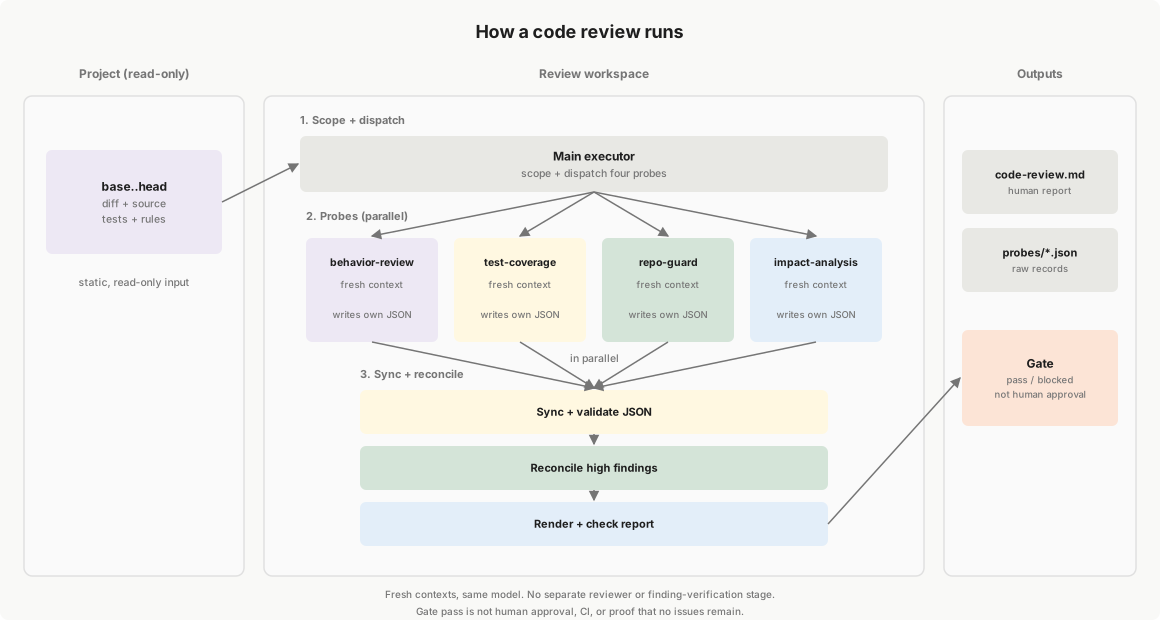
Review Process
Check items are not hardcoded in this file; they are driven by the
references/probes.yamlregistry. Probe implementation details are inreferences/probes/<probe-name>.md; this file covers main workflow orchestration and shared probe execution boundaries.Execution boundary: static review by default. For coverage checks, prefer reusing an existing report; when measurement is needed, coverage commands may be run within what this round's task allows. Other checks remain read-only evidence. Do not modify the reviewed source code during review. Test and CI output are review evidence; all tests green does not mean the behavior is correct.
Determine the review scope:
At the start, the main executor runs the environment check once. Read tool paths, versions, and missing items from its JSON and hand off usable commands to probes as needed:
"${CODE_REVIEW_PYTHON:-python}" -X utf8 "$CODE_REVIEW_SKILL_DIR/scripts/check-environment.py"Resolve failed required checks first; add
--bash /path/to/bashto select Bash explicitly. Ifrgis missing, use the returned fallback and read untracked files separately. Results go to stdout and need no artifact file; tool availability applies to the environment running the command.Choose a mode; when unspecified, review uncommitted changes by default. The base/head below are recorded as concrete commit IDs.
- Uncommitted changes (worktree): base is the current HEAD.
Use
git diff <base> --to collect staged and unstaged changes; usegit ls-files --others --exclude-standard -zto collect untracked files, and review their full contents as newly added code. - Committed range (commits): use the user-specified base/head,
and collect the diff with
git diff <base> <head> --. When head is omitted, use the current HEAD and review only that commit range.
Read the corresponding source:
- In worktree mode, read the working tree files.
- In commits mode, use
git show <head>:<path>to read the target version, and read base when an older version is needed. File scans use only on-disk files consistent with the target version.
Record and hand off: save the mode, base, target (working tree or head), changed-file list, and diff, for use by all probes. Use NUL separators when processing the file list programmatically, and pass each path as a quoted argument.
After collecting scope, initialize a new run before dispatching:
bash "$CODE_REVIEW_SKILL_DIR/scripts/collect-metrics" init {slug} --mode worktree
# or: init {slug} --mode commits --base {base} --head {head}
The returned JSON gives
review_dir,output_dir,line_target,branch_target, andsnapshot_id. With--mode, init also writesreview-snapshot.json, which pins the reviewed source (worktree file hashes or the fixed base/head commits). New runs must pass--mode; omitting it keeps the legacy behavior. Existing active directories, archived runs, or event history with the same slug are rejected. Use a unique slug for a new review; explicitly continuing the same run reuses its directory without init. Never dispatch two runs writing the same directory. Pass the actual directory and effective targets to all probes, overriding the registry's coverage defaults. Init creates the report template. After a fix or astale-reviewresult, runsnapshot {slug}to update the snapshot, re-run the affected probes, re-render the report, and check the gate again. Source inspection is read-only; the workflow writes reports, probe JSON, review-snapshot.json, events, and archive metrics.- Uncommitted changes (worktree): base is the current HEAD.
Use
Read the registry and determine the probe list: Read
references/probes.yamland decide byrequires:- Specified but missing / unreadable →
error - Optional input not provided →
skipped, stating what is missing - Available → execute
- Specified but missing / unreadable →
Run probes in parallel:
Dispatch: the main executor dispatches an independent agent per probe according to the registry, providing the review scope, diff, project root, skill path, that probe's inputs and
params, the path toreferences/probes/common.md, and the "Execution boundary" above. Require each agent to readcommon.mdbefore its probe-specific document. Also pass any provided requirements, acceptance criteria, and change context as text or file paths, and ask each probe to read relevant material. Note missing inputs without inventing them. If dependency source or contract material is already available, pass its path, version, and origin for on-demand reuse; do not pre-download all dependencies.The agent reads the instructions pointed to by the registry entry's
fileandreferences/output-schema.md, and executes according to the parameters. Run in batches when concurrent slots are insufficient; if independent agents are unavailable, run serially and record the limitation.Shared probe constraints: defined once in
references/probes/common.md. Include its path in every dispatch; do not repeat or paraphrase the rules per probe.Handoff: every probe must have JSON for this run. Record skip or error reasons according to the output contract; on execution errors, preserve findings already made and let the other probes continue. If an agent fails to start or returns no valid result, the main executor records
errorand the reason without reusing old results.test-coveragehands off the report path, target version, numerator/denominator, and percentage for valid coverage via its return message, and the main executor reports them;--lineaccepts only diff line coverage:bash "$CODE_REVIEW_SKILL_DIR/scripts/collect-metrics" coverage {slug} --line {diff-line-coverage}Add
--branch {branch-coverage}when a branch value exists, or report only that item. Omit unmeasured or inapplicable metrics without filling in 0; do not call it when neither value is valid. A single-item report updates only that item, and the script does not verify the statistical basis.Aggregation: after all agents finish, the main executor runs the synchronization command. The script reads
requiredfrom the registry and computes counts at each level from the probe JSON; do not rewrite raw results or hand-fill counts. Do not deduplicate across probes yet; count by original finding ID, which may include duplicate records of the same root cause:bash "$CODE_REVIEW_SKILL_DIR/scripts/collect-metrics" sync {slug} --probesThis step invalidates the previous batch's reconciliation state, and reconciliation is not recorded yet.
Reconciliation completeness check: Derive the final counts automatically from the probe JSON:
bash "$CODE_REVIEW_SKILL_DIR/scripts/collect-metrics" sync {slug}requiredonly controls whether that probe'sfailed/errorexecution status directly blocks; it does not change the finding closure requirement. High findings from any probe enter reconciliation and still block merge until closed; medium/low are recorded in the report and excluded from the reconciliation total:RECONCILE_TOTAL = total number of high findings RECONCILE_DONE = number of those whose status is reconciled or false-positive RECONCILE_PENDING = TOTAL - DONERun it even when there are no high findings, explicitly recording the zero result; do not substitute old counts or hand-filled numbers. Fix format errors first; if records are missing, IDs are duplicated, or statuses conflict, synchronization fails, no counts are written, and the old result must not be used to pass. When there are unresolved issues (
RECONCILE_PENDING > 0), still deliver the report this round and list the blocking items; do not proceed toward merge. After follow-up fix tasks complete, re-review the affected parts; seeexecution.max_retryinreferences/probes.yamlfor the re-dispatch limit.Compile the report:
Fill in the review scope, explanation, fix suggestions, and limitations per the template; do not embed raw JSON in the body; when acceptance criteria are provided, complete the item-by-item check-off first.
The script displays
unverified_itemsas "Pending confirmation" in Findings without including them in severity counts; original records retain their IDs, evidence, and counts; when showing the number of distinct issues, group them by the same root cause and consequence and list the corresponding IDs, without raising severity due to duplication or substituting the displayed count for probe or reconciliation counts.Run this command to generate the report's facts section from the JSON, validate the display, and obtain the final answer summary; it stops immediately if any step fails:
bash "$CODE_REVIEW_SKILL_DIR/scripts/collect-metrics" finalize {slug}The scripts update only the
code-review:probes/gatemarker regions under Findings and Review Conclusion, preserving other body text and raw JSON. Rendering validates before an atomic update and can be repeated; it stops when markers are missing or duplicated. Validation covers IDs, locations, evidence, severity, status, and counts.summaryvalidates the report first and outputs the machine summary only when it is consistent. The high/medium/low counts, finding IDs, and blocking conclusion in the final answer must follow the summary; do not add unrecorded issues or omit recorded high findings. Deliver the report, blocking items, and unverified content to the user; you may add explanations and suggestions, but must not rewrite the automatic regions or overturn known blocking facts."No recorded blocking items" does not mean acceptance, coverage, tests, or CI have passed. Both
gate-pass {slug} code-reviewandarchivewith review records validate the report first, then synchronize counts, and do not automatically fix a rewritten display.verify-reportchecks only that the report regions match the probe JSON; it does not check source freshness.gate-pass {slug} code-reviewfirst re-computesreview-snapshot.json. If the reviewed source changed, it returnsstale-review(exit 3) without writing a gate event.
Any of the following conditions blocks merge. This round's report lists the blocking items; the table below gives the follow-up handling requirements:
| Blocking condition | Follow-up action |
|---|---|
A required probe is failed / error (PROBE_REQUIRED_FAILED > 0) |
Handle the issues found or the execution error, then re-run the corresponding probe |
The reviewed source no longer matches review-snapshot.json (stale-review) |
Update the snapshot and re-review per step 1 |
A high finding has not completed reconciliation (RECONCILE_PENDING > 0) |
Handle per step 4, and re-dispatch the affected probes after fixing |
Reconciliation was never reported (RECONCILE_REPORTED=0) |
Complete step 4; run the final synchronization even when there are no high findings |
| Coverage data was provided and is below baseline (below project line_target; default 85%) | List the coverage gaps, add tests, and re-review |
| Acceptance criteria were provided and not all pass, or the criteria themselves are ambiguous | List the failing items; clarify ambiguity first, and do not self-check them as passing |
A high finding remains in wontfix |
Complete handling per the output contract; "won't fix" cannot offset a pending item |
See section 4 of references/output-schema.md for how execution status and input errors are determined.
Script validation verifies consistency between report records and counts; it cannot prove the checks were sufficient.
Output Contract
- Main report:
{output_root}/active/{slug}/code-review.md, generated per the sections and filling requirements inassets/code-review.md. - Machine records:
{output_root}/active/{slug}/probes/<probe-name>.json, format perreferences/output-schema.md; the human report's facts section is derived from them. - Review snapshot:
{output_root}/active/{slug}/review-snapshot.json, written byinit --mode;gate-pass code-reviewuses it to reject stale evidence.
Historical records must be explicitly migrated to standalone JSON; do not infer from free text or auto-fill zeros, and do not read old embedded blocks at the same time.
Optional Wrap-up
The following items are done conditionally, not as mandatory steps each round:
- Acceptance: when acceptance criteria are provided, check them off one by one before the final conclusion; otherwise skip and say so.
- lessons: when a
lessons/directory exists and something that actually happened this round is worth reusing, record it with the specific problem, cause, and handling:- Pitfalls hit during implementation →
lessons/pitfalls.md - Cases where AI output was corrected →
lessons/bad-cases.md - New architectural decisions →
lessons/arch-decisions.md
- Pitfalls hit during implementation →
- Archive: when archiving is needed, move
{output_root}/active/{slug}/to{output_root}/archive/{YYYY}/.
Tips for Code Review Gate
- • Start a fresh session after installing so your agent picks up the new skill.
- • This skill ships scripts. Read them before the first run, and run it in a project without secrets first.
- • It bundles reference files. The agent reads them only when needed, so they cost no context until then.
- • It is part of a pack with 2 skills. Install only the ones you need with --skill to keep triggers precise.
- • If two skills overlap, mention the one you want by name.
Questions about Code Review Gate
What does the Code Review Gate skill do?
Use when code has been written, before committing, or when merging a PR; also when the user says "review my code", "check before commit", "take a look at this change", "PR review", or asks for a strict review/merge gate.
How do I install Code Review Gate?
Run "npx skills add kyy-logs/code-review-gate-skill --skill code-review-gate" in your project. The skills CLI installs it for Claude Code, Cursor, Codex and 70+ other agents. In Claude on the web, upload the skill folder as a ZIP under Customize > Skills.
Does Code Review Gate work in Cursor and Codex?
Yes. Code Review Gate uses the open SKILL.md format, so it works in Claude Code, Claude, Cursor, OpenAI Codex, Gemini CLI, GitHub Copilot and other agents that support agent skills.
Is Code Review Gate free?
Code Review Gate is open source on GitHub under the MIT license. It is free to install; check the license before commercial use.
Who made Code Review Gate?
Code Review Gate is published by kyy-logs in the kyy-logs/code-review-gate-skill repository, together with 1 other skills.