 aaitor
Install Devrel Video
Pick your agent. Every command is ready to paste.
npx skills add aaitor/skill-video-studioThe open skills CLI detects your agents (Claude Code, Cursor, Codex and 70+ more) and installs to the right folder. Add -g to install globally.
01
Install it
Run the command above, or upload the folder in Claude.
02
Ask naturally
Describe the task. Your agent loads devrel-video when the request matches its description.
03
Name it if needed
If it does not trigger, say “use the devrel-video skill”. In Codex, type $devrel-video.
DevRel Video Studio — /devrel-video
A thin orchestrator. It does not reimplement capture or composition — it drives:
- playwright-cli (
page.screencast) for live interaction capture, - HyperFrames for composition + deterministic MP4 render,
- FFmpeg / ffprobe for convert, master, and QA.
Read references/production-notes.md first for environment gotchas (sandbox flags, init flags, CDN vendoring, determinism) and the production steps for music, narration, avatar, subtitles, and multi-environment (terminal ⇄ browser) (all supported — steps 5.4–5.8; the template and manifest carry seams for each).
For studio installation and prerequisites, see the repository-root docs/installation.md. The quick repository demo in examples/README.md demonstrates intake only; use the production workflow below for actual videos.
When to use
- "record / make / produce a walkthrough, demo, catalog tour, or promo of
<web product / URL>" - "update / re-render an existing devrel-video project"
Inputs — gather, never guess
- URL (+ start command if the product is local).
- Flow: the 2–4 beats to show (e.g. browse → filter → open a detail).
- Brand: reuse
brands/<name>/, or extract from the URL (step 3). - Output: format(s) + duration target. Default: silent 16:9, ~25–40 s.
- Environments (optional) — a demo can switch between the browser and Claude Code (terminal). Name the order in the prompt ("prompt in Claude Code → the catalog in the browser → back to Claude Code") →
environments:inbrief.yaml. Terminal beats are captured with VHS (step 5.8); a pure-browser video is the default. - Audio / avatar (optional, all prompt-selectable) — set any of these straight from the prompt, and write them into
brief.yaml:- voice: the narration voice — male
leo/dan/zac, femaleleah/tara/jess/mia/zoe(match the presenter; offer samples if unsure). "…narrated with voicedan" →narration: dan. Regenerating with a different voice makes a new variant (see 5.4). - music on/off, subtitles languages, avatar at intro/CTA (+ its private
avatar_platepath).
- voice: the narration voice — male
- Approved claims: numbers/names allowed on screen — pull from the captured page, never invent (guide §7/§8).
Workflow
1 · Intake → projects/<slug>/brief.yaml
Copy templates/brief.example.yaml. Confirm the audience, the one message, the CTA, and the beats.
2 · Explore (before recording)
Open the URL headless; snapshot + screenshot. Confirm: no login wall, no PII / keys / wallets on screen, and stable selectors for each beat. Prefer exact a[href="…"] and getByRole locators; always add a fallback selector so one missing element can't abort the capture.
3 · Brand → brands/<name>/
scripts/brand-extract.sh <url> <name> → tokens.json (real palette + fonts) + logo.svg. Use these in the composition. Never invent a palette. Reuse an existing brands/<name>/ if you already have one for the product (brands/acme/ is the default placeholder brand).
4 · Capture → projects/<slug>/capture.mp4
Copy templates/hero-script.js → capture.js; edit the beats (eased scrollTo, real locators, deliberate pauses, all-forward navigation so page.screencast survives route changes). Then:
scripts/capture.sh projects/<slug>/capture.js "<start-url>" → records capture.webm, converts to capture.mp4. Contact-sheet it; re-record on layout shift, PII, or a mis-click.
5 · Compose → projects/<slug>/index.html
Copy templates/composition.html to projects/<slug>/index.html and fill it from the brief + tokens (skip hyperframes init: it refuses a folder that already holds the capture, and the render only needs index.html):
title card (real claims) → footage in a browser frame → chapter lower-thirds synced to the capture beats (+ the title-card offset) → CTA. Give every animated element a stable id (GSAP and lint both require it).
5.4 · Narration (optional — drives the timeline)
For a narrated cut the voice sets the timing. Write ~1 line per beat (clean text: no parens/version numbers, em-dash → comma). Synth each with Orpheus in a voice that matches the presenter — male leo/dan/zac, female leah/tara/jess/mia/zoe (offer samples if unsure): scripts/tts.sh "<line>" vo1.wav <voice> (set ORPHEUS_URL/ORPHEUS_KEY — see scripts/_env.sh; reference TTS is orpheus-tts). Then adapt projects/<slug>/narrate.py (copy the template — footage length, beat times, SPOKEN lines, captions) — it measures the lines, computes scene/chapter times, and writes voice.wav, re-timed captions.<lang>.srt, and timing.json. Apply that timing to the composition with scripts/retime.py projects/<slug> (idempotent — rewrites every data-start/data-duration + GSAP position by id, so total tracks the voice), then mix (next step), render. Swapping the voice later is one command: scripts/variant.sh projects/<slug> <voice> runs the whole chain — re-TTS → narrate → retime → mix → re-lip-sync the avatar bubbles (if any) → render → renders/out-<voice>.mp4 (add --no-avatar to skip the GPU step). narrated-devrel mode.
5.5 · Music (optional)
Local, license-clean bed — no auth, no model:
python3 .claude/skills/devrel-video/scripts/gen-bgm.py bed.wav && ffmpeg -i bed.wav -b:a 192k projects/<slug>/bgm.mp3,
then add the <audio id="bgm" class="clip" src="bgm.mp3" … data-track-index="9" data-volume="0.85"> seam to the
composition (lower the volume under narration). For a produced track: /media-use resolve --type bgm
(HeyGen catalog — needs heygen sign-in) or --local-only (MusicGen), dropped into the same seam. With narration, don't stack two audio clips — pre-mix: scripts/mix-audio.sh bgm.wav voice.wav narration-mix.mp3 ducks the bed under the voice and masters to −16 LUFS; use that one file in the seam at data-volume="1".
5.6 · Subtitles (optional)
Author caption cues timed to the beats → projects/<slug>/captions.<lang>.srt — soft, toggleable, platform-standard; one file per language covers "alternative subtitles". Ship the .srt next to the video (YouTube/LinkedIn read it). For autoplay-muted social, burn a hard cut: scripts/subtitles.sh projects/<slug> captions.en.srt. When narration exists, derive the cues from its transcript (WhisperX via /media-use) instead of authoring.
5.7 · Avatar (optional — face-only presenter)
A face-only circular bubble, lip-synced, shown ONLY at intro / one transition / CTA (product stays the hero — a full-time presenter reads as a webinar). Depends on narration. Trim the exact line the mouth should say from narration-mix.mp3 so lips match what's heard: ffmpeg -ss <t0> -to <t1> -i projects/<slug>/narration-mix.mp3 -ar 16000 -ac 1 line.wav. Then scripts/avatar.sh <plate> line.wav projects/<slug>/avatar-face.mp4 — runs LatentSync (256) on your own GPU host over SSH (set AVATAR_HOST/LS_DIR — see scripts/_env.sh; reference is an AMD ROCm box), lip-syncs, then pins the face (per-frame face-tracking via track_crop.py — follows the face every frame at constant size, so the head stays put in the small circle instead of drifting; vidstab alone can't fix a moving subject). Add a <video class="clip face-bubble" src="…" data-start data-duration data-track-index="11"> element with a shared .face-bubble CSS class (border-radius:50% = the circle) + a GSAP pop-in / fade-out over that window (data-duration = the line's length). For a bubble at more than one moment (e.g. intro and CTA), run avatar.sh once per line and add one element per window; set .face-bubble z-index above any full-screen scene card it overlaps (the CTA card is z-index 8 → bubble z-index 9). The <plate> is the avatar_plate: from brief.yaml — a private recording kept OUTSIDE the (public) repo (convention: ~/Videos/<Org>/DevRel/Talking_Head/<name>/); generated avatar-*.mp4 bubbles are gitignored, never committed. Format: front-on, sitting still, even light, mouth visible, ≥ the line's length; any fps (avatar.sh normalizes to 25 fps — LatentSync's rate, else the lips drift). Brighten a backlit plate first (ffmpeg -vf eq=brightness=0.06:contrast=1.10:gamma=1.12), and raise STEPS=30 (env, default 20) for a crisper mouth. ~10 min/clip cold. narrated-devrel + avatar.
5.8 · Multi-environment (optional — terminal ⇄ browser)
For a demo that moves between the CLI and the web (e.g. prompt in Claude Code → the product in the browser → back to Claude Code): capture each terminal beat with scripts/capture-terminal.sh <tape> — VHS renders the real Claude Code TUI headlessly (pixel-perfect; no sandbox flag needed) to term<N>.mp4. Copy templates/terminal-script.tape; set the demo dir + prompt. Sanitize like step 2 — the terminal is the CLI's screen: record in a clean throwaway dir (host paths show in the prompt and in tool calls), unset CLAUDE_CODE_CHILD_SESSION (kills the "transcript saving is off" warning), alias claude to claude --strict-mcp-config (hides the "N MCP servers need authentication" line — the flag lives in the alias so the recorded command stays a clean claude), and Escape onboarding popups. A live model turn is non-deterministic (wording + surprise popups vary) — for a repeatable cut, script a fixed answer (the HTML-terminal re-enactment — templates/cc-terminal.html) or record a good take and trim. Capture browser beats as usual (step 4). Then compose: place the beats as sequential timeline clips with terminal-frame / browser-frame chrome and hand off by fading each beat through the brand teal (the .bg shows through) — a pure crossfade ghosts terminal text through the page; fading over .bg is clean and adds the scale-pop the browser cut uses. See the MULTI-ENVIRONMENT seam in templates/composition.html. Quick non-composition preview: scripts/stitch-envs.sh out.mp4 0b1020 term1.mp4 capture.mp4 term2.mp4. Worked example of the re-enactment approach: templates/cc-terminal.html (a self-contained, renderable Claude Code beat). Tooling: VHS (go install) + ttyd (auto-fetched by the script) — for a free-form unscripted real session, record with asciinema and render with agg instead.
6 · Render + QA → projects/<slug>/renders/
scripts/render-qa.sh projects/<slug> → high master + web-compressed copy + ffprobe + contact sheet. Gates before "done":
hyperframes lint0 errors ·hyperframes checkpasses (Contrast AA).- ffprobe: target dims/fps/duration, video stream present, non-zero size.
- Contact sheet: no clipped text, correct product state, chapters aligned, no PII.
- Security: no keys/wallets/PII; all CDN assets vendored for confidential projects.
- Terminal beats: sanitized — no host paths, no "transcript saving is off" / MCP-auth warnings, no onboarding popups on screen.
6.1 · Thumbnail (required deliverable)
Every video also ships a YouTube thumbnail (not just the QA contact sheet): copy templates/thumbnail.html → projects/<slug>/thumbnail.html, fill it from the brief + brands/<name>/tokens.json (kicker, headline, url label), then scripts/thumbnail.sh projects/<slug> → renders/thumbnail.jpg (1280×720, <2MB; pulls the hero shot from capture.mp4). For a README/social loop, a short GIF off the master: ffmpeg -ss <t> -to <t> -i renders/out.mp4 -vf "fps=12,scale=880:-1,palettegen" … → paletteuse.
Delegation map — do not reinvent
| Need | Use |
|---|---|
| Live interaction capture | playwright-cli page.screencast (templates/hero-script.js) |
| Terminal / Claude Code capture | VHS .tape (templates/terminal-script.tape) + scripts/capture-terminal.sh |
| Stitch terminal ⇄ browser beats (quick preview) | scripts/stitch-envs.sh (fade through brand teal) |
| Static screenshots + brand tokens | hyperframes capture <URL> |
| Composition + render | HyperFrames + templates/composition.html |
| Creative direction (promo) | /product-launch-video, /hyperframes-creative |
| Audio (music/SFX/voice) + captions | /media-use, /hyperframes-audio |
| Narration timing → composition | templates/narrate.py (writes timing.json) + scripts/retime.py |
| Swap the narration voice (whole re-gen) | scripts/variant.sh <project> <voice> |
| Master / convert / QA | FFmpeg / ffprobe (scripts/render-qa.sh) |
| YouTube thumbnail (1280×720) | scripts/thumbnail.sh (templates/thumbnail.html) |
Roadmap
Music, narration, avatar, subtitles, and multi-environment (terminal ⇄ browser) are all supported (steps 5.4–5.8). Still open: portrait/social output profiles (9×16 recompose, not crop) and a short muted web-loop. See references/production-notes.md.
Tips for Devrel Video
- • Start a fresh session after installing so your agent picks up the new skill.
- • This skill ships scripts. Read them before the first run, and run it in a project without secrets first.
- • It bundles reference files. The agent reads them only when needed, so they cost no context until then.
- • If two skills overlap, mention the one you want by name.
Questions about Devrel Video
What does the Devrel Video skill do?
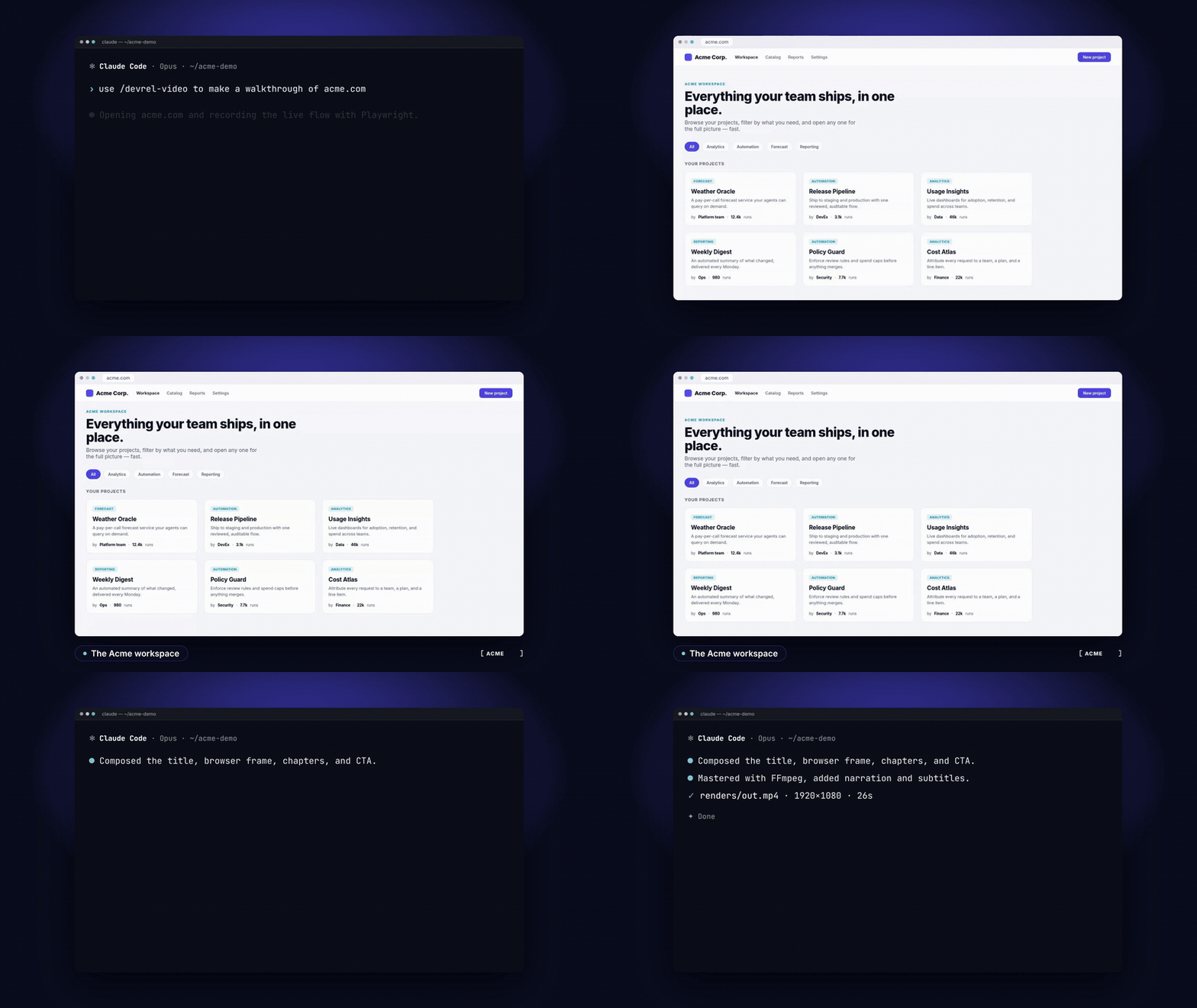
Produce a silent DevRel-style product walkthrough video from a web URL. Playwright records the live flow, HyperFrames composes title/frame/chapters/CTA, FFmpeg masters. Use when asked to record, make, or update a product demo, feature walkthrough, catalog tour, or promo video from a web product.
How do I install Devrel Video?
Run "npx skills add aaitor/skill-video-studio" in your project. The skills CLI installs it for Claude Code, Cursor, Codex and 70+ other agents. In Claude on the web, upload the skill folder as a ZIP under Customize > Skills.
Does Devrel Video work in Cursor and Codex?
Yes. Devrel Video uses the open SKILL.md format, so it works in Claude Code, Claude, Cursor, OpenAI Codex, Gemini CLI, GitHub Copilot and other agents that support agent skills.
Is Devrel Video free?
Devrel Video is open source on GitHub under the MIT license. It is free to install; check the license before commercial use.
Who made Devrel Video?
Devrel Video is published by aaitor in the aaitor/skill-video-studio repository.






