 VintLin
Install Skill Flow
Pick your agent. Every command is ready to paste.
npx skills add VintLin/skill-flowThe open skills CLI detects your agents (Claude Code, Cursor, Codex and 70+ more) and installs to the right folder. Add -g to install globally.
01
Install it
Run the command above, or upload the folder in Claude.
02
Ask naturally
Describe the task. Your agent loads skill-flow when the request matches its description.
03
Name it if needed
If it does not trigger, say “use the skill-flow skill”. In Codex, type $skill-flow.
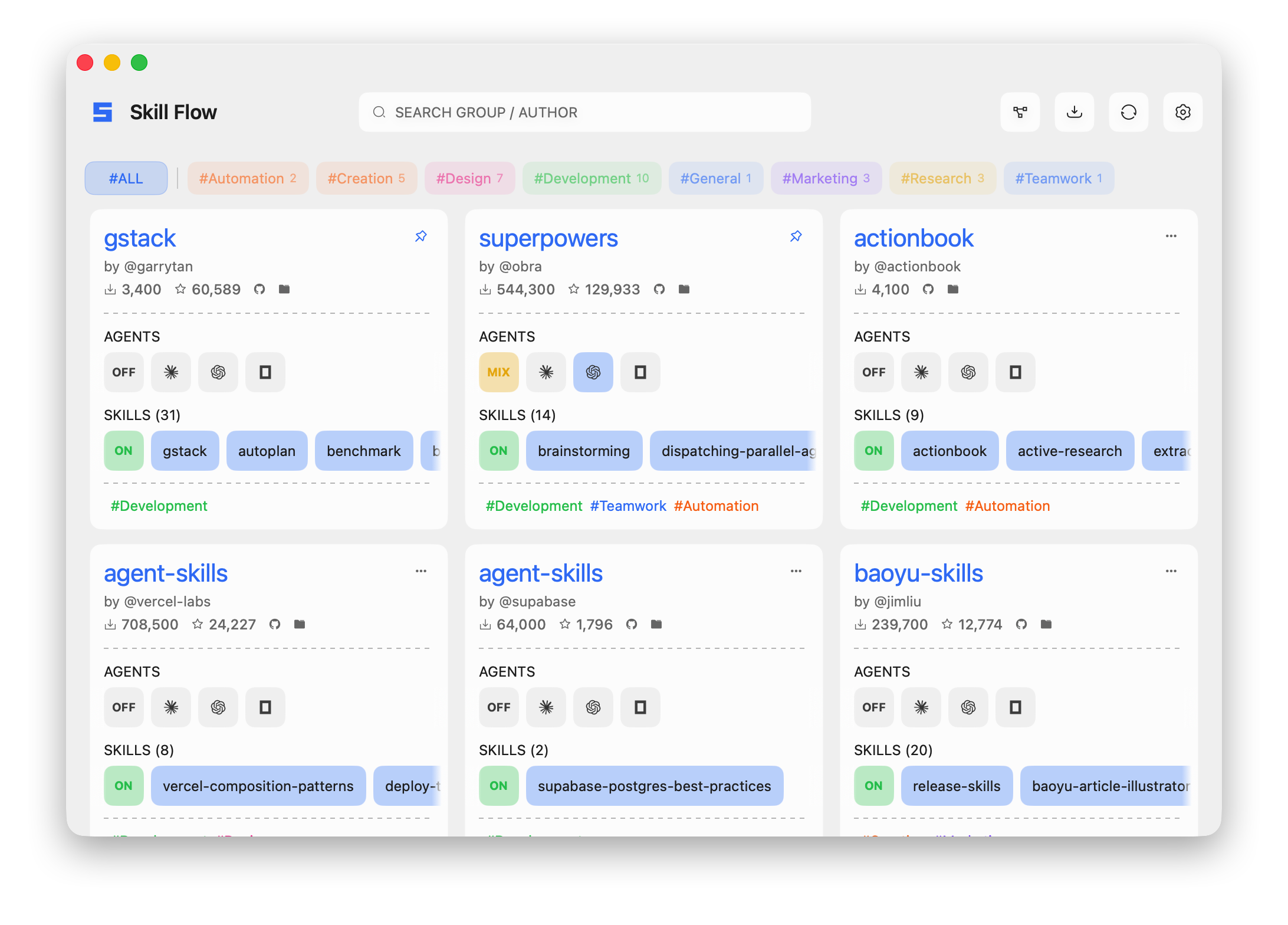
Skill Flow
Overview
Operate Skill Flow through its CLI without editing state files directly. Prefer the machine-readable bridge protocol for agent work; use the human CLI only for simple commands that already emit usable output.
Core Rules
- Use
skill-flow bridge --jsonfor structured operations and parse the JSON response. - Never edit
~/.skillflow, target skill directories, manifests, locks, or source checkouts directly. - Inspect before mutating: run
list,inspect,doctor, orpreview-import-sourcefirst. - Default imports to OFF by using
enabledTargets: []unless the user explicitly asks to deploy immediately. - Treat skill enablement and deployment as draft state: use
apply, not direct filesystem edits. - Explain impact before state-changing operations; require explicit confirmation for destructive operations.
Command Entry
Use installed CLI:
skill-flow bridge --json --request '{"protocolVersion":"1.0","command":"list"}'
Inside this repository, use the workspace CLI:
npm run -w skill-flow dev -- bridge --json --request '{"protocolVersion":"1.0","command":"list"}'
For payload details, read references/bridge-commands.md before crafting a bridge request.
Workflow
- Classify the task as read-only, normal mutation, or destructive.
- Read current state with
listor a narrower inspect command. - For imports, run preview or prepare first; build draft from returned skill selectors.
- For enable/disable/deploy, call
applywith fullselectedLeafIdsandenabledTargets. - For updates or repairs, run
doctorbefore and after. - Report
ok, warnings, errors, changed source ids, and any blocked actions.
Safety Levels
| Level | Operations | Rule |
|---|---|---|
| Read-only | list, doctor, inspect, inspect-enrichment, search-import-groups, scan-local-import-groups, preview-import-source, inspect-state-migration |
Execute directly when useful. |
| Normal mutation | bootstrap, commit-import-source, import-source, apply, update, toggle-pin, rename-source, collections, save-settings |
Summarize impact; proceed if the user requested that exact change. |
| Destructive/high-risk | uninstall, non-dry-run migrate-state, broad repairs such as repair-state --all |
Require explicit confirmation after identifying exact ids and scope. |
Common Tasks
| User asks | Do |
|---|---|
| "What groups do I have?" | Bridge list. |
| "Search for a skill" | Human CLI skill-flow find <query> --json, or bridge import search for remote groups. |
| "Import this repo, keep skills off" | preview-import-source, then import-source or prepare-import-source + commit-import-source with enabledTargets: []. |
| "Turn these skills on for Codex" | inspect, map names to leaf ids, then apply with enabledTargets: ["codex"]. |
| "Disable a skill" | inspect, remove its leaf id from selectedLeafIds, then apply with remaining ids. |
| "Why did deployment fail?" | doctor, then inspect for the affected source. |
| "Remove this group" | list/inspect, ask for confirmation, then uninstall. |
Common Mistakes
- Using interactive
configoraddwhen bridge JSON can do the same job. - Omitting
protocolVersion: "1.0"from bridge requests. - Passing skill names to
apply; it requires leaf ids such assource-id:skills/review. - Importing with non-empty
enabledTargetswhen the user did not request deployment. - Running
uninstallor migration based on display names instead of exact source ids.
Tips for Skill Flow
- • Start a fresh session after installing so your agent picks up the new skill.
- • It bundles reference files. The agent reads them only when needed, so they cost no context until then.
- • If two skills overlap, mention the one you want by name.
Questions about Skill Flow
What does the Skill Flow skill do?
Use when the user asks Codex to inspect, import, enable, disable, deploy, update, repair, migrate, or uninstall Skill Flow skill groups through the skill-flow CLI or bridge protocol.
How do I install Skill Flow?
Run "npx skills add VintLin/skill-flow" in your project. The skills CLI installs it for Claude Code, Cursor, Codex and 70+ other agents. In Claude on the web, upload the skill folder as a ZIP under Customize > Skills.
Does Skill Flow work in Cursor and Codex?
Yes. Skill Flow uses the open SKILL.md format, so it works in Claude Code, Claude, Cursor, OpenAI Codex, Gemini CLI, GitHub Copilot and other agents that support agent skills.
Is Skill Flow free?
Skill Flow is open source on GitHub under the Apache-2.0 license. It is free to install; check the license before commercial use.
Who made Skill Flow?
Skill Flow is published by VintLin in the VintLin/skill-flow repository.











