 suyuan2022
Install Whatis
Pick your agent. Every command is ready to paste.
npx skills add suyuan2022/suyuan-skill --skill whatisThe open skills CLI detects your agents (Claude Code, Cursor, Codex and 70+ more) and installs to the right folder. Add -g to install globally.
01
Install it
Run the command above, or upload the folder in Claude.
02
Ask naturally
Describe the task. Your agent loads whatis when the request matches its description.
03
Name it if needed
If it does not trigger, say “use the whatis skill”. In Codex, type $whatis.
whatis
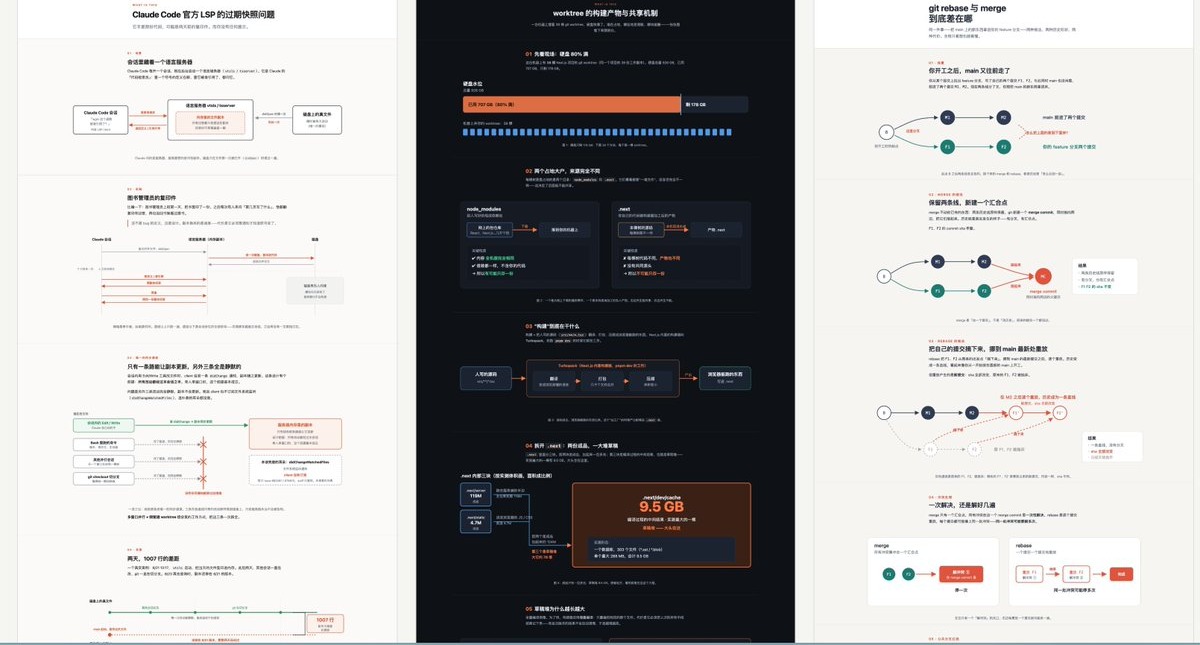
Explain like I'm someone who knows nothing about this topic, using an HTML page with big pictures and few words.
No Artifact tool in this environment: write a self-contained HTML file (inline SVG/CSS, no external deps) to a temp directory (e.g. $TMPDIR or /tmp), then open it.
If the current context is not enough to explain the topic, gather enough context yourself before drawing. Every node in a diagram must be backed by evidence; never fabricate.
Draw real diagrams in SVG, freely picking and combining whatever fits: flowchart, sequence diagram, state diagram, architecture/block diagram, C4, dependency graph, call graph, ER diagram, class diagram, DFD, swimlane, deployment diagram, timeline, Gantt, git graph, before/after comparison, bar/line chart, treemap, heatmap... If none fits, design your own — expression comes before templates. Tables are for enumerations only and don't count as diagrams.
A diagram exists to make structure visible: who talks to whom, what causes what, what changes when. Draw each one in the shape the reader's eye already knows — boxes for parts, arrows for actions, lanes for actors, time flowing one way. Make each diagram read at two distances: at a glance only the backbone shows — a name per box, a verb per arrow, one path the eye can follow; the detail lives in a quieter layer of smaller, dimmer annotations that never competes with the backbone. Color like a print magazine: warm paper background, ink for text and lines, one muted accent doing all the pointing; status reads from marks and line weight, tinted from the same palette. One diagram, one point: when the content outgrows the shape, split it or summarize the tail — shrinking the type is never the answer. The test: someone who reads only the diagrams and captions still gets the whole story.
Give the page a wide content column with visible margins on both sides: diagrams span the column (each SVG gets a viewBox and width:100% so it scales with the window), prose sits in a narrower measure within it.
Match the user's language in the explanation. Keep technical terms, API names, CLI commands, and exact error strings verbatim in English.
Tips for Whatis
- • Start a fresh session after installing so your agent picks up the new skill.
- • It is part of a pack with 4 skills. Install only the ones you need with --skill to keep triggers precise.
- • If two skills overlap, mention the one you want by name.
Questions about Whatis
What does the Whatis skill do?
What Is This — explain anything as a picture-first HTML page. Use when the user types /whatis , or asks what something is / how it works and would be better served by big diagrams than by paragraphs.
How do I install Whatis?
Run "npx skills add suyuan2022/suyuan-skill --skill whatis" in your project. The skills CLI installs it for Claude Code, Cursor, Codex and 70+ other agents. In Claude on the web, upload the skill folder as a ZIP under Customize > Skills.
Does Whatis work in Cursor and Codex?
Yes. Whatis uses the open SKILL.md format, so it works in Claude Code, Claude, Cursor, OpenAI Codex, Gemini CLI, GitHub Copilot and other agents that support agent skills.
Is Whatis free?
Whatis is open source on GitHub under the MIT license. It is free to install; check the license before commercial use.
Who made Whatis?
Whatis is published by suyuan2022 in the suyuan2022/suyuan-skill repository, together with 3 other skills.











