Skip to content
alyn
Microsoft Official

skills-for-copilot-studio

A skill for AI-coding tools to build and edit Microsoft Copilot Studio agents as YAML — with schema validation, templates, and AI-powered skills. Suited for Claude Code, GitHub Copilot CLI, and more.

$npx skills add microsoft/skills-for-copilot-studio
Stars
490
Installs
331
Forks
102
Updated
6 days ago
License
MIT

31 skills in this pack.

50
Microsoft

add-action

Guide users through adding a new connector action to a Copilot Studio agent. Connector actions require UI-based connection setup, so this skill walks users through the Copilot Studio portal…

Pack490331Coding
50
Microsoft

add-adaptive-card

Generate and insert an Adaptive Card into a Copilot Studio topic using AdaptiveCardPrompt. Use when the user asks to add an adaptive card, rich card, form card, info card, confirmation…

Pack490331Coding
50
Microsoft

add-knowledge

Add a knowledge source (public website or SharePoint) to a Copilot Studio agent. Use when the user asks to add a knowledge source, documentation URL, website, or SharePoint site for the…

Pack490331Research
50
Microsoft

add-other-agents

Add child agents, connected agents, or other multi-agent patterns to a Copilot Studio agent. Use when the user asks to create a sub-agent, child agent, connected agent, or call another…

Pack490331Coding
50
Microsoft

clone-agent

Clone a Copilot Studio agent from the cloud. Guides through environment selection, agent selection, and downloads agent YAML files.

Pack490331Coding
50
Microsoft

create-eval

Create plugin development eval scenarios (JSON files with natural prompts and deterministic checks for testing plugin skills). NOT for Copilot Studio in-product evaluation — use…

Pack490331AI engineering
50
Microsoft

create-eval-set

Create a test set CSV file for import into Copilot Studio's in-product Evaluate tab. Reads the agent's topics, instructions, and knowledge sources to generate meaningful test cases with…

Pack490331Testing
50
Microsoft

edit-action

Edit an existing action (TaskDialog) in a Copilot Studio agent. Supports connector actions and MCP server actions. Modify inputs, outputs, descriptions, connection mode, and other…

Pack490331Coding
50
Microsoft

int-patterns

Pattern library for Copilot Studio agent design. Contains proven and recommended implementation patterns with YAML examples. Used by the Advisor agent to suggest patterns and by the Author…

Pack490331Design
50
Microsoft

int-reference

Reference tables for Copilot Studio YAML authoring: triggers, actions, variables, entities, Power Fx functions, templates. Preloaded by author and advisor agents.

Pack490331Coding
50
Microsoft

manage-agent

Push/pull Copilot Studio agent content via the VS Code extension's LanguageServerHost LSP binary. Handles authentication (interactive browser login for push/pull, device code flow for chat…

Pack490331Coding
50
Microsoft

new-topic

Create a new Copilot Studio topic YAML file. Use when the user asks to create a new topic, conversation flow, or dialog for their agent.

Pack490331Coding
50
Microsoft

run-tests-kit

Run a batch test suite via the Copilot Studio Kit (Dataverse API). Uses the Power CAT Copilot Studio Kit to execute test cases against a published agent and produces pass/fail results with…

Pack490331Testing
49
Microsoft

add-generative-answers

Add generative answer nodes (SearchAndSummarizeContent or AnswerQuestionWithAI) to a Copilot Studio topic. Use this instead of /add-node when the user asks to add grounded answers…

Pack490331Coding
49
Microsoft

edit-triggers

Modify topic triggers — trigger phrases and model description. Use when the user asks to add, remove, or change trigger phrases, or edit a topic's model description.

Pack490331AI engineering
49
Microsoft

int-project-context

Shared project context for all Copilot Studio sub-agents. Provides project structure, schema lookup usage, and skill invocation guidance.

Pack490331Productivity
48
Microsoft

add-global-variable

Add a global variable to a Copilot Studio agent. Use when the user needs a variable that persists across topics in the same conversation and can optionally be visible to the AI orchestrator.

Pack490331Coding
48
Microsoft

add-node

Add or modify a node in an existing Copilot Studio topic. Use when the user asks to add a question, message, condition, variable, or other node to a topic. Do NOT use this for generative…

Pack490331Coding
48
Microsoft

test-auth

Authenticate for Copilot Studio evaluation API and SDK chat. Caches a token that is shared across run-eval and chat-sdk skills. Run this before any eval or SDK chat workflow. Requires an…

Pack490331Backend
47
Microsoft

analyze-evals

Analyze exported evaluation results from Copilot Studio's Evaluate tab. The user provides a CSV file exported from the Copilot Studio UI; this skill parses it, identifies failures, and…

Pack490331AI engineering
47
Microsoft

chat-directline

Send a message to a Copilot Studio agent via DirectLine v3. Use for agents with no auth or manual auth. Requires a token endpoint URL or DirectLine secret.

Pack490331Backend
47
Microsoft

edit-agent

Edit Copilot Studio agent settings, instructions, or configuration. Use when the user asks to change agent instructions, display name, conversation starters, AI settings, or generative…

Pack490331Coding
47
Microsoft

run-eval

Run evaluations against a Copilot Studio agent via the Power Platform Evaluation API. Works on DRAFT agents — no publish step required. Lists test sets, starts a run, polls until complete…

Pack490331AI engineering
46
Microsoft

chat-sdk

Send a message to a Copilot Studio agent via the Copilot Studio Client SDK (M365). Use for agents with integrated auth (Entra ID SSO). Requires an App Registration Client ID.

Pack490331Coding
46
Microsoft

detect-mode

Detect a Copilot Studio agent's authentication mode (DirectLine vs M365) by querying Dataverse. Returns the mode and connection details needed to chat.

Pack490331Backend
46
Microsoft

directline-chat

DEPRECATED: Use /copilot-studio:chat-with-agent instead — it auto-detects DirectLine vs M365 mode. This skill is kept for backwards compatibility only.

Pack490331Coding
45
Microsoft

chat-with-agent

DEPRECATED: Use /copilot-studio:detect-mode then /copilot-studio:chat-directline or /copilot-studio:chat-sdk instead.

Pack490331Coding
45
Microsoft

list-kinds

List all available kind discriminator values from the Copilot Studio YAML schema. Use when the user asks what kinds/types are available.

Pack490331Coding
45
Microsoft

list-topics

List all topics in the Copilot Studio agent with their trigger types, phrases, and action counts. Use when the user wants to see what topics exist.

Pack490331Coding
45
Microsoft

lookup-schema

Look up Copilot Studio YAML schema definitions. Use when the user asks about schema structure, element properties, or how to use a specific YAML kind.

Pack490331Coding

Showing 30 of 31. See the full pack on GitHub.

From the README

How to use skills-for-copilot-studio

Skills for Copilot Studio

A plugin for Claude Code, GitHub Copilot CLI, and VS Code that enables authoring, testing, and troubleshooting Microsoft Copilot Studio STANDARD agents through YAML files — directly from your terminal or editor.

Looking for the plugin for GitHub Copilot harness agents? See the New Microsoft Copilot Studio Plugin.

Prerequisites

Installation

From marketplace (Claude Code / GitHub Copilot CLI)

/plugin marketplace add microsoft/skills-for-copilot-studio
/plugin install copilot-studio@skills-for-copilot-studio

From VS Code Extensions Store (GitHub Copilot)

Search for Skills for Copilot Studio in the VS Code Extensions using the @agentPlugins filter to view and click Install.
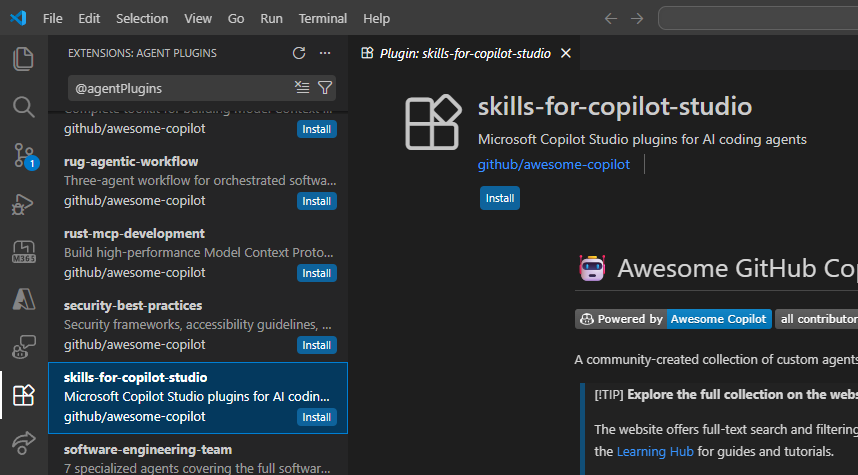
VS Code Extensions Store

From a local clone

git clone https://github.com/microsoft/skills-for-copilot-studio.git

# Load for a single session
claude --plugin-dir /path/to/skills-for-copilot-studio

# Or install persistently (user-wide)
claude plugin install /path/to/skills-for-copilot-studio --scope user

# Or install for a specific project
claude plugin install /path/to/skills-for-copilot-studio --scope project

Updating

The update process depends on how you installed the plugin:

Interface Update Method Details
Claude Code CLI Auto-update (recommended) Marketplace plugins update automatically. No action needed.
GitHub Copilot CLI Manual Run /plugin update skills-for-copilot-studio in an interactive session, or copilot plugin update skills-for-copilot-studio from the terminal.
VS Code Extension auto-update VS Code handles updates automatically when extension auto-update is enabled in settings.

Usage

The plugin provides four sub-agents, each backed by a specialized agent:

/copilot-studio:copilot-studio-manage       Clone, push, pull, and sync agent content between local files and the cloud
/copilot-studio:copilot-studio-author       Create and edit YAML (topics, actions, knowledge, triggers, variables)
/copilot-studio:copilot-studio-test         Test published agents — point-tests, batch suites, or evaluation analysis
/copilot-studio:copilot-studio-advisor Design guidance, agent review, and troubleshooting

Quick Start

# Clone an agent from the cloud (guided flow — opens browser for sign-in)
/copilot-studio:copilot-studio-manage clone

# Design and build topics
/copilot-studio:copilot-studio-author Create a topic that handles IT service requests

# Pull latest, push your changes
/copilot-studio:copilot-studio-manage pull
/copilot-studio:copilot-studio-manage push

# Publish in Copilot Studio UI, then test
/copilot-studio:copilot-studio-test Send "How do I request a new laptop?" to the published agent

# Get design advice and review
/copilot-studio:copilot-studio-advisor Review my agent for improvements and known pitfalls

See SETUP_GUIDE.md for a full end-to-end walkthrough including validation, testing options, and troubleshooting.

Disclaimer

This plugin is an experimental research project, not an officially supported Microsoft product. The Copilot Studio YAML schema may change without notice. Always review and validate generated YAML before pushing to your environment — AI-generated output may contain errors or unsupported patterns.

Contributing

See CONTRIBUTING.md for local development setup, building bundled scripts, and project structure.

Questions

What is microsoft/skills-for-copilot-studio?

A skill for AI-coding tools to build and edit Microsoft Copilot Studio agents as YAML — with schema validation, templates, and AI-powered skills. Suited for Claude Code, GitHub Copilot CLI, and more.

How do I install skills-for-copilot-studio?

Run "npx skills add microsoft/skills-for-copilot-studio" and choose the skills you want. Many packs also document their own install path (for example a Claude Code plugin marketplace) in the README below.

How many skills are in skills-for-copilot-studio?

31 SKILL.md skills. Alyn lists 30 of them with their own pages.