 bitjaru
Install Styleseed
Pick your agent. Every command is ready to paste.
npx skills add bitjaru/styleseed --skill styleseedThe open skills CLI detects your agents (Claude Code, Cursor, Codex and 70+ more) and installs to the right folder. Add -g to install globally.
01
Install it
Run the command above, or upload the folder in Claude.
02
Ask naturally
Describe the task. Your agent loads styleseed when the request matches its description.
03
Name it if needed
If it does not trigger, say “use the styleseed skill”. In Codex, type $styleseed.
The skill itself
SKILL.md
StyleSeed
Use the user's goal to choose one first workflow below. This is the only registered core skill; the 22 workflows and their executable dependencies ship inside this directory. Read only the selected workflow, then references needed for that task.
Registry-first artifact boundary
When .styleseed/project.json and .styleseed/artifacts/index.json exist, resolve the requested
artifact first. Read its .styleseed/bundles/<artifact-id>.md and manifest. A partial or invalid
registry is an error; never fall back to the global legacy bundle. Legacy projects may use
.styleseed/effective-rules.md only when no registry exists.
Before the first workflow in a project/task session, follow the update preflight.
Working contract
- Preserve approved project design choices. Support expert judgment; a score is not human acceptance.
- Resolve the current artifact first. For multiple plausible artifacts, ask one bounded clarification question.
- Never fan out to run every workflow. Choose exactly one first workflow; it may call the required gates.
- Honor the user's authorized scope. Audit, score, verify, and status requests do not authorize edits. Workflow metadata records the intended tool/scope boundary even though it is not host registration metadata.
- Paths in workflow files are relative to those files. Resolve installed scripts from this skill's actual directory, never assume a particular agent folder or download a missing sibling skill.
- In older instructions,
/ss-build,$ss-build, and otherss-*names mean the corresponding internal workflow. Readworkflows/<name>/WORKFLOW.md; do not invoke an unregistered skill. Users may sayStyleSeed build,$styleseed build, or the old workflow name in natural language. - Learning is an optional extension, not part of the core install. Only for explicit learning capture,
use separately installed
ss-learn; if absent, report that dependency and never auto-install it.
Choose exactly one first workflow
| Request | Read |
|---|---|
| Build or redesign a screen, page, or component | build |
| First setup or missing design lock | setup |
| Explore creative directions; direction not yet selected | studio |
| Use screenshot, URL, Figma export, or existing UI as a reference | reference |
| What is wrong with this screen; UX critique | audit |
| Review implementation against project design rules | review |
| Score implementation or run code/evidence gates | score |
| Inspect rendered output, screenshot, or spacing in pixels | verify |
| Change spacing/density or another single design axis | dial |
| Apply an aesthetic profile | restyle |
| Brand color, semantic palette, or design tokens | tokens |
| Named animation or motion treatment | motion |
| Specifically scaffold a page | page |
| Specifically generate a reusable component | component |
| Compose existing primitives into a UI pattern | pattern |
| Accessibility audit and requested fixes | a11y |
| Quick design lint | lint |
| Navigation and user flows | flow |
| UX microcopy | copy |
| Loading, empty, success, or error states | feedback |
| Update installation or consolidate old skill entries | update |
| Compile rules, inspect local install/bundle/evidence health | resolve |
For status-only requests use resolve's read-only scripts/styleseed-doctor.mjs; do not update,
recompile, or visually inspect instead. For vague requests infer the first step from project state
and the user's goal; ask only when an unresolved choice materially changes the work.
Tips for Styleseed
- • Start a fresh session after installing so your agent picks up the new skill.
- • This skill ships scripts. Read them before the first run, and run it in a project without secrets first.
- • It bundles reference files. The agent reads them only when needed, so they cost no context until then.
- • It is part of a pack with 2 skills. Install only the ones you need with --skill to keep triggers precise.
- • If two skills overlap, mention the one you want by name.
Questions about Styleseed
What does the Styleseed skill do?
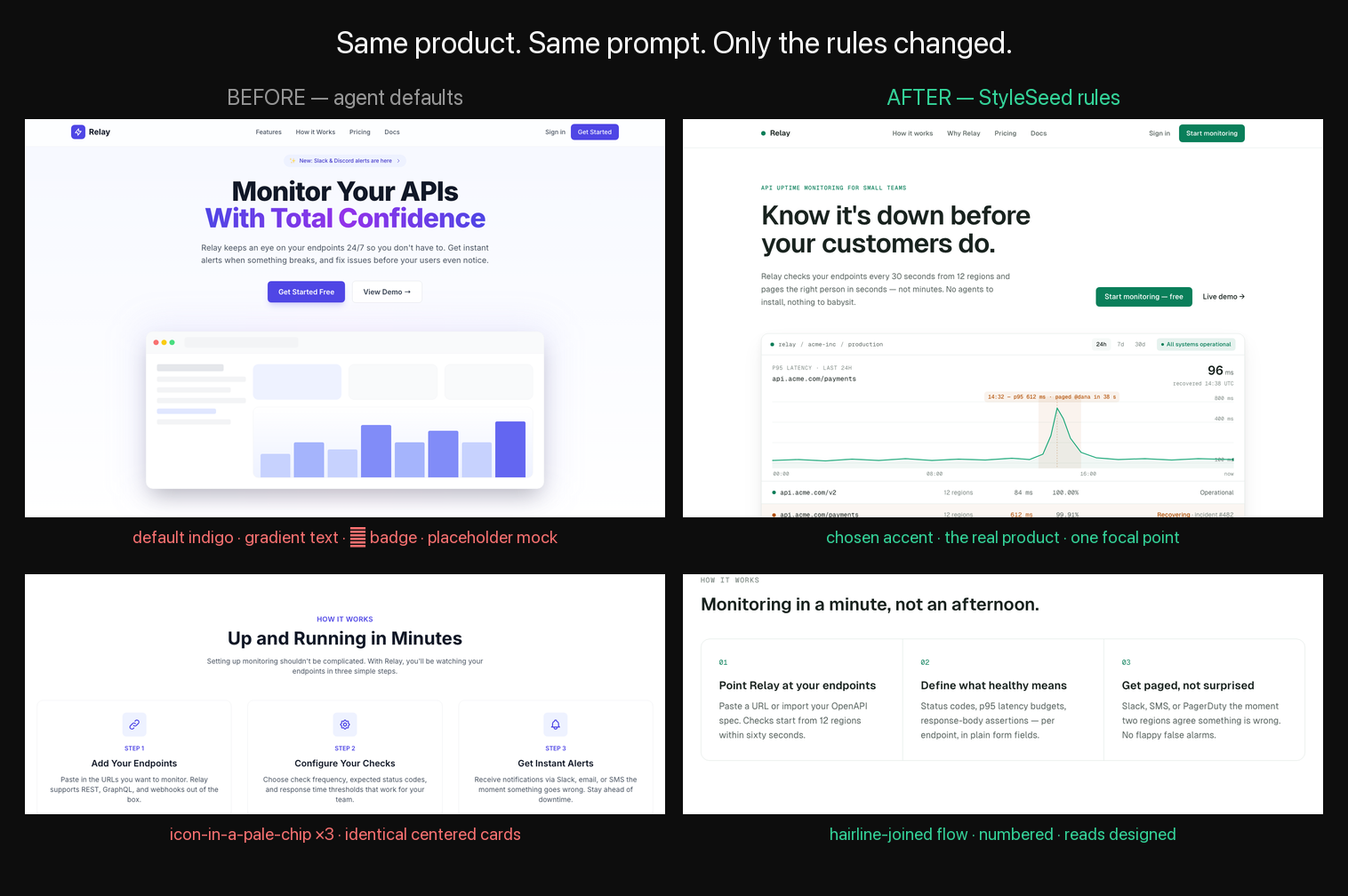
Build, improve, or inspect UI with StyleSeed. Preserves project design choices and routes setup, layout, tokens, review, rendered verification, and updates through one entry point.
How do I install Styleseed?
Run "npx skills add bitjaru/styleseed --skill styleseed" in your project. The skills CLI installs it for Claude Code, Cursor, Codex and 70+ other agents. In Claude on the web, upload the skill folder as a ZIP under Customize > Skills.
Does Styleseed work in Cursor and Codex?
Yes. Styleseed uses the open SKILL.md format, so it works in Claude Code, Claude, Cursor, OpenAI Codex, Gemini CLI, GitHub Copilot and other agents that support agent skills.
Is Styleseed free?
Styleseed is open source on GitHub under the MIT license. It is free to install; check the license before commercial use.
Who made Styleseed?
Styleseed is published by bitjaru in the bitjaru/styleseed repository, together with 1 other skills.













