 vibe-motion

Install Fisheye Motion
Pick your agent. Every command is ready to paste.
npx skills add vibe-motion/skills --skill fisheye-motionThe open skills CLI detects your agents (Claude Code, Cursor, Codex and 70+ more) and installs to the right folder. Add -g to install globally.
01
Install it
Run the command above, or upload the folder in Claude.
02
Ask naturally
Describe the task. Your agent loads fisheye-motion when the request matches its description.
03
Name it if needed
If it does not trigger, say “use the fisheye-motion skill”. In Codex, type $fisheye-motion.
Fisheye Motion(鱼眼畸变 + 摩尔纹 + 暗角)
把一张图片(或视频)做成「用手机拍屏幕」的质感:以聚焦点为中心的桶形鱼眼畸变、 跟随画面弯曲的扫描线与固定屏幕扫描线干涉出的摩尔纹、四周暗角; 并可输出「推镜聚焦到目标区域 + 黄色标注块从左滑入」的 Remotion 视频。
工作流程
本 skill 不内置代码,所有实现都在独立仓库里。第一步永远是 clone 项目:
git clone https://github.com/vibe-motion/fisheye-motion.git
cd fisheye-motion
仓库结构:
- 根目录:Vite + React 交互测试应用(拖图、点击/拖动移动聚焦、导出 PNG)
src/lib/FisheyeRenderer.js:与框架无关的 WebGL 渲染器(核心,全部效果的 shader 在这里)src/lib/FisheyeView.jsx:React 组件封装vibe-motion-app/:Remotion 项目,输出聚焦推镜 + 标注滑入的视频
然后根据用户需求走两条路之一。
路线 A:静态效果 / 交互预览(Vite 应用)
npm install
npm run dev
- 默认加载
public/test.jpg;把用户的图放进public/或直接拖入页面。 - 点击/拖动画面改变聚焦(畸变中心);「导出 PNG」保存当前效果帧。
- 要在自己的 React 项目里复用,直接拷
src/lib/两个文件,用法见仓库 README。
路线 B:视频输出(Remotion 项目)
cd vibe-motion-app
pnpm install          # postinstall 自动准备 headless 浏览器
pnpm run dev          # Remotion Studio 预览
- 把用户的源图放到
vibe-motion-app/public/下。 - 改
motion/config.js:imageSrc:public 下的文件名videoWidth/videoHeight:按源图等比取偶数尺寸focusFrom→focusTo:聚焦推镜起止点(0..1 源图坐标,y 向下)rect:标注块位置{ x, y, w, h }(0..1 源图坐标)、颜色、混合模式- 时间轴:
focusStartSec/focusEndSec(推镜段)、maskStartSec/maskEndSec(标注滑入段)、durationSeconds
- 渲染:
# 透明 ProRes 4444 mov(默认)
pnpm run remotion:render

# H.264 mp4
REMOTION_OUTPUT=out/fisheye.mp4 REMOTION_CODEC=h264 REMOTION_PIXEL_FORMAT=yuv420p pnpm run remotion:render
- 需要 GIF 预览时用 ffmpeg 转:
ffmpeg -i out/fisheye.mp4 -vf "fps=15,scale=540:-1:flags=lanczos,palettegen" /tmp/p.png
ffmpeg -i out/fisheye.mp4 -i /tmp/p.png -lavfi "fps=15,scale=540:-1:flags=lanczos[x];[x][1:v]paletteuse=dither=bayer:bayer_scale=4" out/fisheye.gif
定位目标区域(rect / focusTo)
用户通常会说「聚焦到 XX 文字/按钮上」。定位方法:
- 用多模态视觉读源图,估计目标区域的 0..1 归一化坐标(y 向下)。
focusTo取该区域中心;rect框住目标,稍留 padding。- 渲染一帧检查(Studio 里拖时间轴,或
REMOTION_OUTPUT=out/check.png配合单帧渲染), 不准就微调坐标重来。畸变会弯曲画面,最终以渲染结果为准。
参数速查
| 参数 | 默认 | 说明 |
|---|---|---|
strength |
1.6 | 畸变强度,0 = 无畸变,p' = p·(1 + strength·r²) / zoom |
zoom |
2 | 中心缩放(配合聚焦推镜) |
moire |
{ intensity: 0.28, scale: 900, angle: 0 } |
摩尔纹强度/频率/角度 |
vignette |
{ amount: 0.85, radius: 0.72, softness: 0.45 } |
暗角 |
rect.blend |
screen |
深色底图白字用 screen;浅色底图深字用 multiply(荧光笔效果) |
注意事项
- Remotion 并行/乱序渲染帧,动画量必须每帧独立计算——已由
motion/timeline.js保证, 改动画逻辑时保持这一约束,不要引入跨帧状态。 - 场景用 WebGL shader,headless 渲染需要
--gl angle,渲染脚本已默认设置。 - 视觉效果非必要不跑自动化验证,渲染后目测(或发关键帧给用户确认)。
效果示例
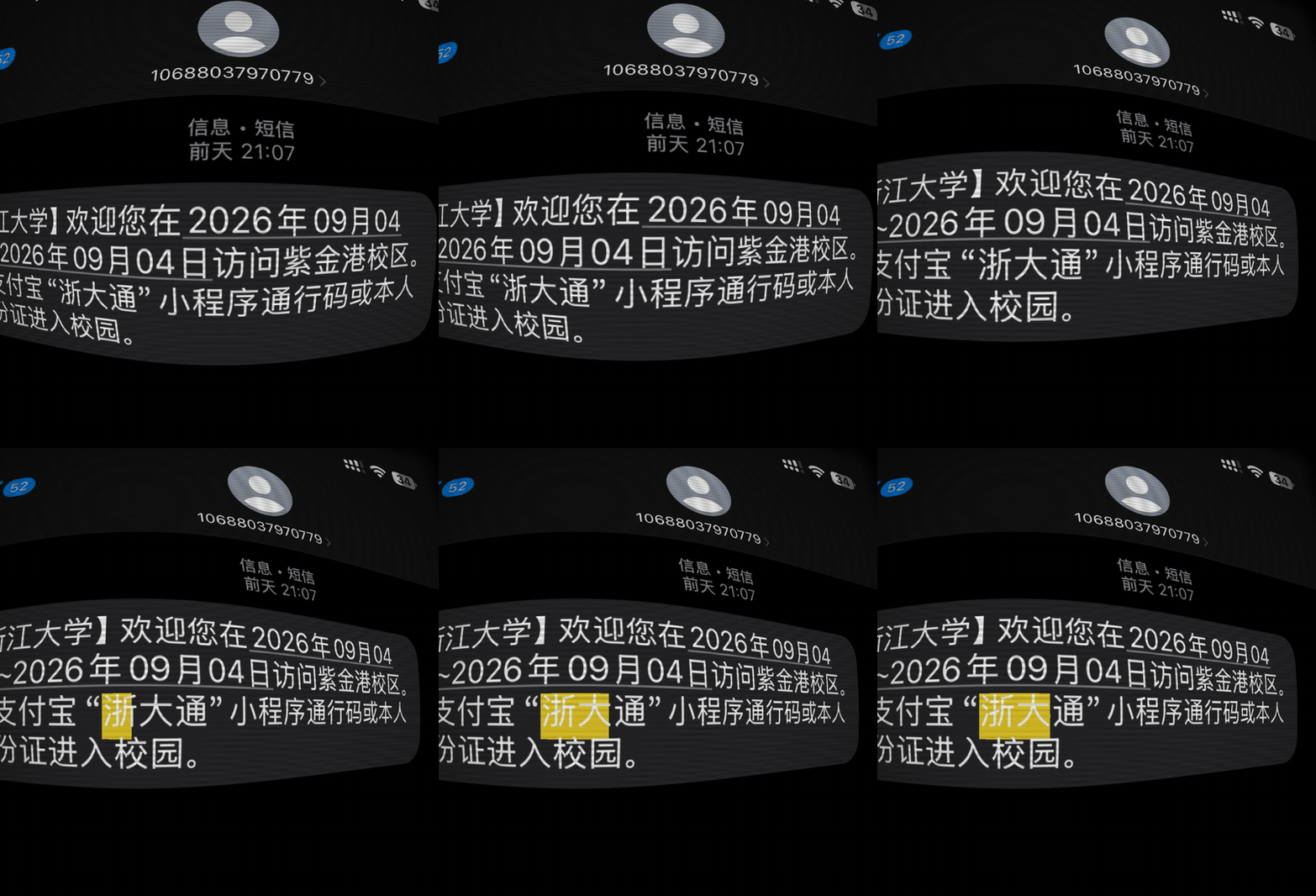
聚焦推镜到「浙大」二字并滑入黄色标注(assets/fisheye-demo.gif):
Tips for Fisheye Motion
- • Start a fresh session after installing so your agent picks up the new skill.
- • It bundles reference files. The agent reads them only when needed, so they cost no context until then.
- • It is part of a pack with 15 skills. Install only the ones you need with --skill to keep triggers precise.
- • If two skills overlap, mention the one you want by name.
Questions about Fisheye Motion
What does the Fisheye Motion skill do?
制作屏摄风格的鱼眼畸变效果与聚焦动画:桶形鱼眼畸变 + 细扫描线/摩尔纹干涉 + 四周暗角, 可对任意图片/视频做「推镜聚焦到某处 + 黄色标注块滑入」的 Remotion 视频输出。 核心是 clone https://github.com/vibe-motion/fisheye-motion 项目并按需改参数渲染。 触发词:鱼眼、fisheye、屏摄、摩尔纹、moire、扫描线、CRT、暗角、vignette、 聚焦推镜、高亮标注动画、screen-photo effect。
How do I install Fisheye Motion?
Run "npx skills add vibe-motion/skills --skill fisheye-motion" in your project. The skills CLI installs it for Claude Code, Cursor, Codex and 70+ other agents. In Claude on the web, upload the skill folder as a ZIP under Customize > Skills.
Does Fisheye Motion work in Cursor and Codex?
Yes. Fisheye Motion uses the open SKILL.md format, so it works in Claude Code, Claude, Cursor, OpenAI Codex, Gemini CLI, GitHub Copilot and other agents that support agent skills.
Is Fisheye Motion free?
Fisheye Motion is open source on GitHub. It is free to install; check the license before commercial use.
Who made Fisheye Motion?
Fisheye Motion is published by vibe-motion in the vibe-motion/skills repository, together with 14 other skills.












