gokayfem
Install Shader Art Coding
Pick your agent. Every command is ready to paste.
npx skills add gokayfem/shader-skillsThe open skills CLI detects your agents (Claude Code, Cursor, Codex and 70+ more) and installs to the right folder. Add -g to install globally.
01
Install it
Run the command above, or upload the folder in Claude.
02
Ask naturally
Describe the task. Your agent loads shader-art-coding when the request matches its description.
03
Name it if needed
If it does not trigger, say “use the shader-art-coding skill”. In Codex, type $shader-art-coding.
Shader Art Coding
Treat shader work as visual engineering: start from the intended image, choose the smallest mathematical model that can produce it, build it in inspectable stages, and verify each stage with a debug view.
Workflow
- Target. State the image: subject, camera and framing, dominant forms, materials, light, motion.
- Route. Pick the rendering model and starting template from
references/subject-routing.md: 2D distance fields (posters, icons, patterns), SDF raymarching (objects, characters), heightfield marching (landscapes), volume integration (clouds, smoke, fire). - Assemble from the library. Find building blocks with
python3 scripts/glsl_tools.py search <words>orreferences/library-index.md, and call them by name. Do not paste or re-derive library code; it is tested. - First image fast. Coordinates, background, one primitive, one light. Then add the debug views.
- Refine in order: proportions, composition, material separation, lighting, atmosphere, color, antialiasing, performance.
- Bundle and check.
python3 scripts/glsl_tools.py bundle shader.glsl -o out.glslinlines exactly the functions used.python3 scripts/glsl_tools.py check out.glsllints it and compiles it with glslangValidator when installed. Fix every error, then deliverout.glsl.
Run the scripts from this skill's directory. They need only Python 3.
Conventions
- Coordinates:
vec2 uv = (2.0 * fragCoord - iResolution.xy) / iResolution.y;, so one pixel is2.0 / iResolution.y. - Scene contract:
vec2 map(vec3 p)returnsvec2(distance, materialId).raymarch,calcNormal,softShadow,calcAOandsdfThicknessall use it. - Debug:
#define DEBUG_MODE 0with 0 final, 1 distance field, 2 normals, 3 ids, 4 steps, 5 masks, 6 lighting terms. - Color pipeline: light in linear and decode picked colors with
srgbToLinear. Then exposure, then the tonemap (tonemapAgXby default, per AA sample), then the average, thenlinearToSrgbonce, thenditherTPDF. - Distances: respect the
@exact/@bound/@approxtags. If a deformation pushes Lipschitz above 1, divide the distance or lower thestepScaleofraymarch.
Hard rules (these break Shadertoy/WebGL)
- No
#versionline, no custom uniforms, nogl_FragColor/texture2D/iGlobalTime. - No
?:on structs. Usevec2(distance, id)orif. - Write float literals:
2.0 * PI,clamp(x, 0.0, 1.0). - No
fract(sin(...) * 43758.5453)hashes. Usehash12/hash22/hash33(integer PCG). Replace them even when porting with "keep the look": the sine hash's exact pattern already differs between GPUs, and a PCG hash on the same integer cell ids gives the noise the same look.checkreports a sine hash as an error. - Guard NaN sources:
atan(0, 0),powof negatives,sqrtof negatives,normalize(vec3(0)). - Keep
dFdx/fwidthout of non-uniform branches and loops, or use an explicit pixel size.
Reference routing
Read only what the task needs:
| File | Read when |
|---|---|
references/subject-routing.md |
starting from a subject ("a jellyfish", "mountains"); maps formal names to subjects |
references/library-index.md |
choosing functions: every library function with signature, exactness and uses |
references/sdf-library-guide.md |
modeling: exactness tiers, blends, neighbor-checked repetition, deformation limits, WebGL pitfalls |
references/rendering-pipeline.md |
lighting rigs, shadows/AO, sky and fog, volumes, tonemapping, AA, performance |
references/noise-use-cases.md |
choosing Perlin/value/simplex/cellular noise, fBm/ridged/billow/warp/hybrid recipes, game use cases and primary-source code links |
references/procedural-buildings.md |
parcel IDs, building massing, setbacks/roofs, facade filtering, city repetition and game integration |
references/terrain-production.md |
terrain representations, designed valleys, slope/altitude materials, tracing limits, chunks and LOD |
references/water-quality.md |
high-quality ocean/coastal water, wave derivatives, Fresnel/refraction/absorption, foam, presets and engine-side upgrades |
references/shader-workflow.md |
planning a complex shader end to end; review checklist |
references/composition-and-debugging.md |
the image reads poorly, or something is visually wrong |
references/formula-cookbook.md |
multi-step recipes: modular cell lattices, terrain synthesis, organic composition |
references/formula-code-couples-sdf.md |
equation-to-code for organic and modular SDF features |
references/formula-code-couples-terrain.md |
heightfields, density fields, accumulation, atmosphere |
references/formula-code-couples-materials.md |
masks, palettes, lighting terms, polish, motion |
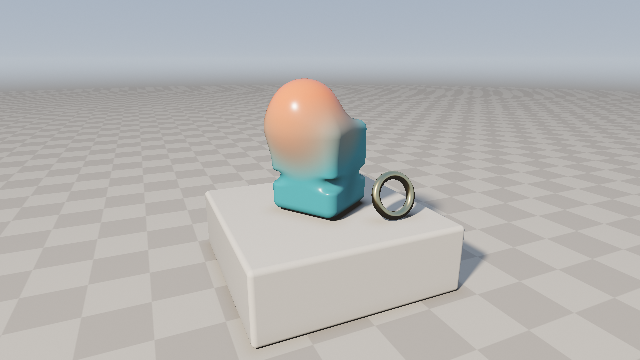
Templates in templates/ are complete, render-verified starting points (gallery in the repository README):
raymarch-sdf.glsl, terrain.glsl, ocean.glsl, volumetric-clouds.glsl, sdf-2d-poster.glsl,
pattern-swatches.glsl, noise-progression.glsl, noise-terrain-map.glsl, procedural-city.glsl,
alpine-valley.glsl, coastal-water.glsl.
Output expectations
When writing a shader:
- Deliver the bundled, paste-ready Shadertoy code with
mainImage(out vec4 fragColor, in vec2 fragCoord). - Avoid textures unless the user provides them.
- Include
DEBUG_MODEswitches and name the art controls as constants at the top. - End with a short tuning guide: which constants control scale, softness, color, light and motion.
- Say whether the shader was compile-checked, and how.
- For buildings/terrain/water, separate implemented features from engine-side upgrades. Do not call a heightfield a cave generator, a material window a modeled recess, or a procedural foam/caustic mask a fluid/light simulation.
- For quality requests, state the target and budget, expose presets/debug views, and inspect rendered output.
Annotate important template presets with
// @variant QUALITY=3(or another defined integer macro) so CI compiles and renders them. Preserve horizon/shore contact and temporal filtering before adding detail.
When improving an existing shader:
- Identify its rendering model and bottlenecks.
- Preserve its intent and interface.
- Fix correctness first, then readability, visual quality and speed.
- Call out risky changes (coordinate scale, material ids, loop counts).
Tips for Shader Art Coding
- • Start a fresh session after installing so your agent picks up the new skill.
- • This skill ships scripts. Read them before the first run, and run it in a project without secrets first.
- • It bundles reference files. The agent reads them only when needed, so they cost no context until then.
- • If two skills overlap, mention the one you want by name.
Questions about Shader Art Coding
What does the Shader Art Coding skill do?
Writes, debugs, and art-directs procedural GLSL fragment shaders (Shadertoy mainImage, WebGL2 / GLSL ES 3.00): SDF raymarching, procedural buildings/cities, 2D distance-field graphics, noise / fBm / domain warping, terrain, ocean/coastal water optics, clouds and other volumes, PBR lighting, color and tonemapping. Ships a verified GLSL building-block library with a bundler and checker. Use when the user asks for a sha
How do I install Shader Art Coding?
Run "npx skills add gokayfem/shader-skills" in your project. The skills CLI installs it for Claude Code, Cursor, Codex and 70+ other agents. In Claude on the web, upload the skill folder as a ZIP under Customize > Skills.
Does Shader Art Coding work in Cursor and Codex?
Yes. Shader Art Coding uses the open SKILL.md format, so it works in Claude Code, Claude, Cursor, OpenAI Codex, Gemini CLI, GitHub Copilot and other agents that support agent skills.
Is Shader Art Coding free?
Shader Art Coding is open source on GitHub under the MIT license. It is free to install; check the license before commercial use.
Who made Shader Art Coding?
Shader Art Coding is published by gokayfem in the gokayfem/shader-skills repository.