 artemnovitckii
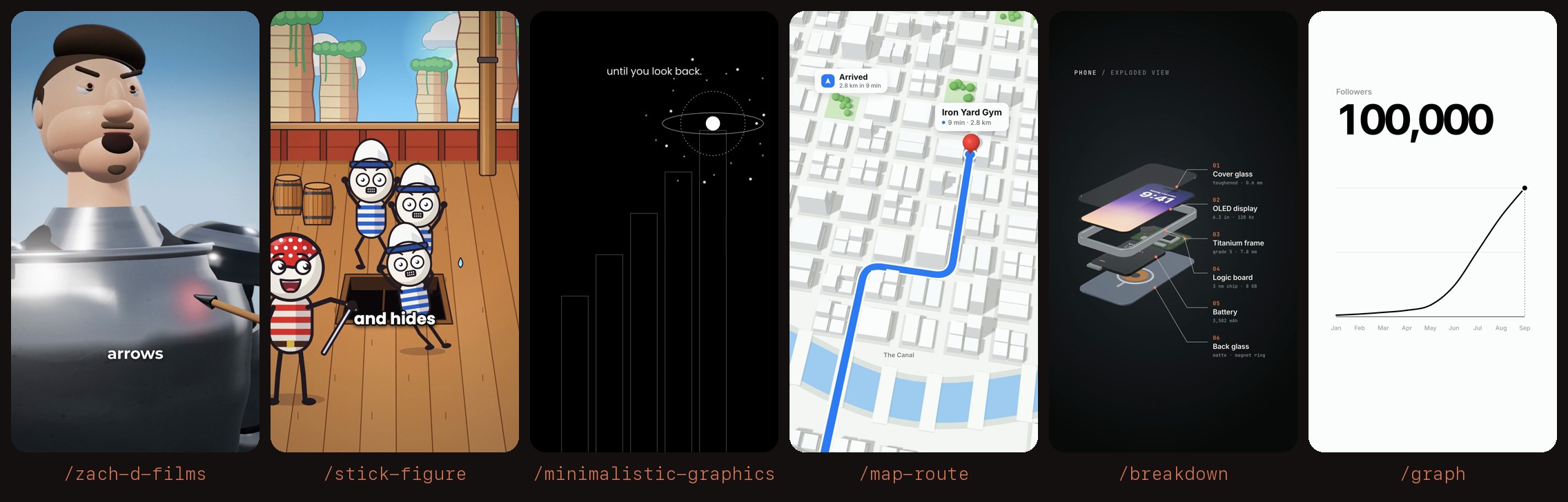
Install Breakdown
Pick your agent. Every command is ready to paste.
npx skills add artemnovitckii/claude-animation-skills --skill breakdownThe open skills CLI detects your agents (Claude Code, Cursor, Codex and 70+ more) and installs to the right folder. Add -g to install globally.
01
Install it
Run the command above, or upload the folder in Claude.
02
Ask naturally
Describe the task. Your agent loads breakdown when the request matches its description.
03
Name it if needed
If it does not trigger, say “use the breakdown skill”. In Codex, type $breakdown.
/breakdown
┌──────────────────────┐
│ PHONE / EXPLODED VIEW│  mono header
│   ▱▱▱▱▱▱ ──── 01 Glass
│   ▱ 9:41 ▱ ── 02 Screen
│   ▱▱▱▱▱▱ ──── 03 Frame │  layers lift apart, the phone turns slowly
│   ▱▱▱▱▱▱ ──── 04 Board │  leader lines draw out to the labels
│   ▱▱▱▱▱▱ ──── 05 Battery
│   ▱▱▱▱▱▱ ──── 06 Back  │
└──────────────────────┘
First use
This skill's folder is the "Base directory" Claude Code shows when it loads it.
SKILL_DIR="<base directory of this skill>"
KIT=$(python3 -c 'import os,sys;print(os.path.realpath(os.path.join(sys.argv[1],"..","..","kit")))' "$SKILL_DIR")
[ -s "$KIT/node_modules/three/build/three.module.js" ] || bash "$KIT/setup.sh"
Needs ffmpeg and Node. It renders with WebGL in headless Chrome.
Steps
- Labels. Ask what the breakdown is for. The model is a phone, so the labels are the user's take on its six layers, top first: the cover glass, the display, the frame, the logic board, the battery and the back. Labels can be literal ("Battery / 3,582 mAh") or a joke ("Battery / never enough").
- Spec. Write
<name>.breakdown.json(below). - Build. Run
python3 "$SKILL_DIR/build.py" <spec.json>. A 3D render takes about 1.5 minutes, most of it HyperFrames waiting on WebGL (asub_timeline_readiness_timeoutwarning is normal). Run with--snap 3.8first to check the labels. - Check the sheet: every label sits right of the phone and inside the red frame, and the numbers run 01 to 06 from top to bottom.
- Hand over the mp4 path.
Spec
{
  "title": "Phone", "subtitle": "Exploded view",
  "labels": [["Cover glass", "toughened · 0.6 mm"], ["OLED display", "6.3 in · 120 Hz"], ["Titanium frame", "grade 5 · 7.8 mm"],
             ["Logic board", "3 nm chip · 8 GB"], ["Battery", "3,582 mAh"], ["Back glass", "matte · magnet ring"]],
  "time": "9:41", "date": "Saturday 1 November", "accent": "#F08A5D"
}
labels: exactly 6, top layer first, each["Name", "short note"]. Names up to about 16 characters, notes about 22.["", ""]hides a label. The numbers are added in screen order.title/subtitle: the header, shown in capitals.time/date: what the lock screen shows.accent: label numbers, leader dots and the battery stripe (hex).hold(optional): extra seconds at the end.out(optional): the output path.
Another object
The spec changes words, not shapes. For another flat, layered object (a tablet, a laptop lid, a card wallet, a smartwatch), copy "$SKILL_DIR/template.html" next to the spec and add "template": "template.html" to the spec. In the copy:
PW,PL,PRset the outline (width, length, corner radius).slab(w, l, r, thickness, material)makes one rounded layer, andtex(w, h, draw)paints a canvas texture onto it (see the battery and the screen).- Each
part(y)is one layer;yis how high it floats when exploded.Y0holds the heights when assembled, andORDERsays which layer leaves first. ANCHORSsays where each label's leader line starts:[part index, [x, y, z] on that part]. Check with--snap 1.0,3.8after every change: assembled at 1.0, exploded and labelled at 3.8.
Taste
- Six labels at most, short and plain. Notes are facts or one dry joke, never slogans.
- Keep the dark backdrop and the right-hand label column; the text stays clear of the phone.
Tips for Breakdown
- • Start a fresh session after installing so your agent picks up the new skill.
- • This skill ships scripts. Read them before the first run, and run it in a project without secrets first.
- • It is part of a pack with 6 skills. Install only the ones you need with --skill to keep triggers precise.
- • If two skills overlap, mention the one you want by name.
Questions about Breakdown
What does the Breakdown skill do?
Makes a 3D exploded-view animation for a reel. A phone floats on a dark studio backdrop, comes apart layer by layer (glass, screen, frame, board and battery, back), and each part gets a thin leader line and a label. Use when the user runs /breakdown or asks for an exploded view, a "what's inside" teardown or a labelled 3D breakdown of a device.
How do I install Breakdown?
Run "npx skills add artemnovitckii/claude-animation-skills --skill breakdown" in your project. The skills CLI installs it for Claude Code, Cursor, Codex and 70+ other agents. In Claude on the web, upload the skill folder as a ZIP under Customize > Skills.
Does Breakdown work in Cursor and Codex?
Yes. Breakdown uses the open SKILL.md format, so it works in Claude Code, Claude, Cursor, OpenAI Codex, Gemini CLI, GitHub Copilot and other agents that support agent skills.
Is Breakdown free?
Breakdown is open source on GitHub. It is free to install; check the license before commercial use.
Who made Breakdown?
Breakdown is published by artemnovitckii in the artemnovitckii/claude-animation-skills repository, together with 5 other skills.










